Start here
getting started on fomo
Download to first trade, with nothing skipped and nothing oversold. Fifteen minutes if you read properly, about four if you do not.
FOMO runs on iOS, Android and the web, all on one account, so pick whichever you have to hand. You can switch later and a position opened on one device is visible and closable on another.
Download the app, or just open it in a browser
Get it from the App Store on iPhone, Google Play on Android, or go straight to fomo.family in any modern browser and skip the install entirely. The web version is not a cut-down companion, it is the full platform.
If you want us credited for the referral, start from our link. It costs you nothing, changes nothing about your account, and is how this site stays free.
Create your account
Onboarding is deliberately short, which is a real advantage over most crypto apps and also the moment to slow down rather than speed up.
Take the two minutes to secure the account properly while you are still calm: a password you have not used anywhere else, two-factor authentication if it is offered, and if you are given a recovery phrase at any point, write it on paper and put it somewhere real. A recovery phrase in a screenshot, a notes app or an email to yourself is a recovery phrase you have shared.
Fund it, small
Two routes. Apple Pay is the fast one and the right choice for a first deposit: no bridging, no gas token, no addresses to copy. Depositing crypto you already hold works too, and if you go that way, match the network exactly and send a test amount first.
Deposit an amount you would genuinely shrug at losing entirely. Not an amount you are confident about. An amount that could go to zero and change nothing about your week. That is the correct first number and it is smaller than you think.
Find your first token
Three ways in: search by name or contract address at the top, browse the Tokens list in the left sidebar with its Watchlist, Trending, Most held and Gainers filters, or watch the Feed to see what traders are buying right now.
For a first trade, pick something established rather than something four minutes old. You are learning the interface, and you want the variable being tested to be your understanding of the app, not whether a brand new token was a scam.

The strip along the top of every token page. Market cap, price, 24H change, 24H volume, liquidity, holders and top-10 concentration. Place the trade
On the token page, the buy panel is on the right, with a Buy and Sell toggle, preset amounts, a free entry field and a Max button. Before you confirm, do three things: read the fee shown for the trade, check the amount of the token you are quoted, and decide your exit.
That last one is the whole discipline. Know the level at which you take profit and the level at which you accept you were wrong, before you have a position and stop being able to think clearly about either.
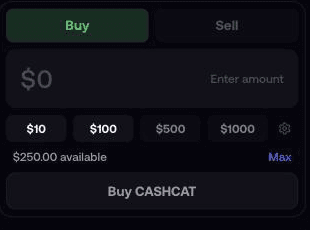
The buy panel, with preset amounts and a Max button. Our own balance is replaced with a placeholder here.
One honest warning
Most people who trade memecoins lose money. Not some, most. Everything on this site is written on that assumption, which is why the risk management guide is the longest thing here and the one we would keep if we could only keep one.
you are in. now learn to trade smart.
The app is not complicated and you now know how to operate it. What is complicated is not giving all of it back, and that is what the rest of the site is for.
- Your first trade, end to end: reading a token page properly and planning the exit.
- Copy trading: how to check whether a trader is good or simply lucky.
- Why most memecoin traders lose: position sizing, rugs, and the rules that outrank all the others.
- The glossary: every word in the feed you have been nodding along to.

account ready?
Make it, fund it small, and come back for the guides.